Backup Guide
The 3-2-1 Backup Rule for a Small Business, Step by Step
One backup on a drive by your desk protects you from a dead laptop. A second copy in the cloud at a separate company protects you from a fire or ransomware. The 3-2-1 rule asks for both, plus the working copy, and a small office can set it up in an afternoon for a few dollars a month.
- Year 1Website
- Year 2Map Listings
- Year 3Booking Tool
- Year 4Front Desk
- Year 5Payments
- Year 6Reports
Same six pieces.
Years of lessons, one read.
Free to read. Most of this guide is open. The finishing pieces at the end come to you when you opt in.
Start Here
- Keep 3 copies of anything you cannot lose, on 2 kinds of storage, with 1 copy outside the building.
- Hard drives do fail. Backblaze measured a 1.73 percent yearly failure rate across its drives in mid 2026.
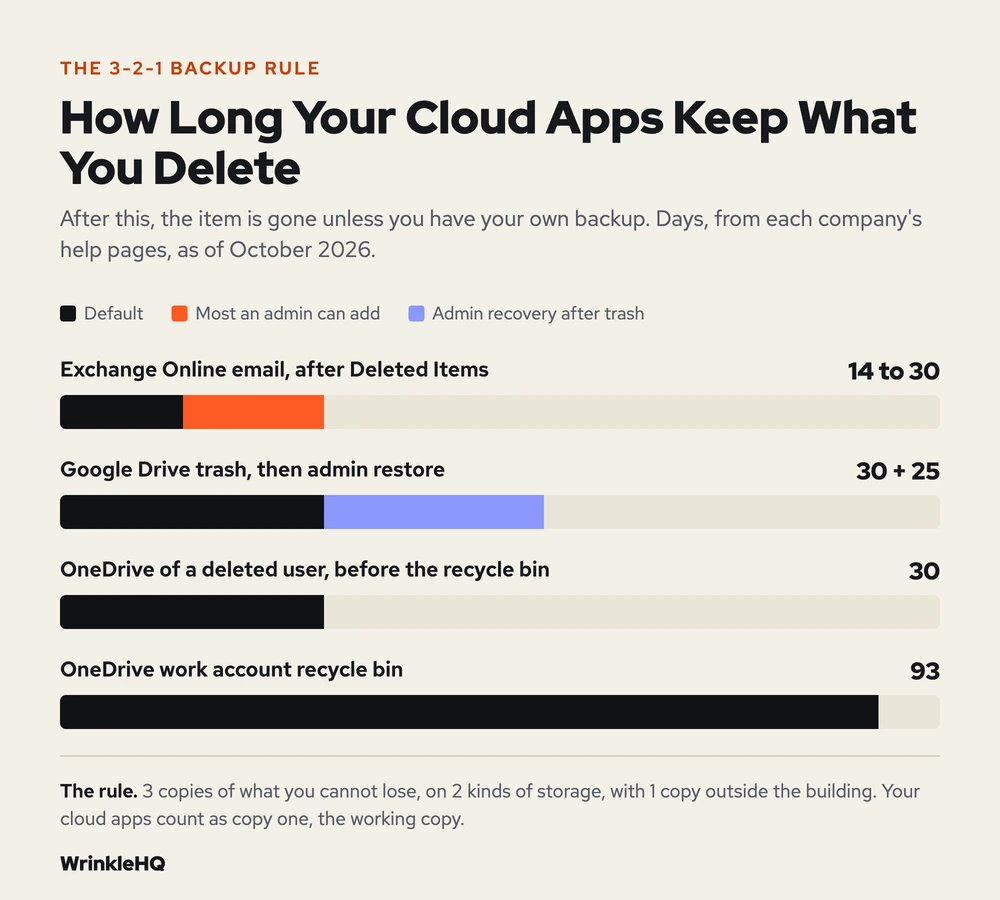
- Google Workspace and Microsoft 365 are your working copy, not a backup. Deleted email in Exchange Online is gone after 14 days by default.
- A sync folder spreads a mistake to every device. A backup keeps old versions.
- Restore one file every month. An untested backup is a guess.
Three Copies, Two Kinds of Storage, One Somewhere Else
Prices updated October 2026.
We built this from jobs we have done and the public sources cited below.
The rule has three numbers, and each one guards against a different bad day.
- 3 copies. The file you work on, plus two backups.
- 2 kinds of storage. The copies live on two different types of device, so one flaw cannot take both.
- 1 copy off site. At least one copy sits outside your building, so a fire, flood or break in cannot reach it.
The rule is older than most people think. A 2012 paper that Carnegie Mellon wrote for US-CERT, the federal cyber team, set it out in those words for home and business data. Its footnote credits Peter Krogh, who put the rule in The DAM Book, a 2009 guide for photographers.
Why bother with two backups? Because a drive is a part, and parts wear out. Backblaze runs more than 350,000 hard drives and publishes how many die. In its report for the second quarter of 2026, the yearly failure rate was 1.73 percent. That sounds small. It means a drive in your office has a real chance of dying in any given year, with no warning.
One copy can fail. Two copies in one room can burn together. Three copies in two places is the cheapest setup where one bad day does not end the business.
What 3-2-1 Looks Like in a Five Person Office
Say you run a five person office. You have a shared drive of quotes, invoices and photos, about 500 GB in all, plus email in Google Workspace or Microsoft 365. This is one setup that meets the rule. The figures are a worked example.
| Copy | Where It Lives | What It Saves You From | Rough Cost |
|---|---|---|---|
| 1. The working copy | Your laptops and the shared drive | Nothing. This is the copy at risk. | What you pay now |
| 2. The local backup | An external drive or a small network drive in the office, run by backup software each night | A dead laptop, a file saved over by mistake. Restores in minutes. | One time drive cost |
| 3. The off site backup | Cloud storage from a backup company, with the copy locked so it cannot be changed for a set time | Fire, theft, flood, and ransomware that wipes the office | About $3.50 a month at Backblaze B2's list price of $6.95 per TB |
Backblaze lists B2 storage at $6.95 per TB each month, with the first 10 GB free. Half a terabyte comes to about $3.48. Other cloud storage firms price in the same range. The software that runs the backup costs extra, and that is where most of the bill sits.
The office copy is the fast one. The cloud copy is the safe one. You want both, because a restore from the cloud can take a day on a slow line, and a local drive is no help when the building is the problem.
We run Shop Desk for a working auto repair shop every day. A lost database there is not a theory. It is the morning the shop cannot quote, invoice or pull up a car. So our rule for our own systems is the same one you see in the table.
Your Cloud Apps Are Not a Backup
This is the gap almost every guide skips. Most small businesses now keep their email and files in Google Workspace or Microsoft 365. Owners assume Google or Microsoft keeps a backup for them. They keep your data running. They do not keep every old version forever.
Each app has a trash can, and each trash can empties on a clock.
| App | How Long Deleted Data Stays |
|---|---|
| Exchange Online email (Microsoft 365) | 14 days by default after it leaves Deleted Items. An admin can raise it to 30 days at most. |
| OneDrive work accounts | 93 days in the recycle bin, unless your admin changed it |
| OneDrive of a deleted user | 30 days by default for someone to save the files, then 93 days in the site recycle bin |
| Google Drive | 30 days in trash. After a user empties it, an admin has 25 more days to recover items. |
Those windows are fine for a file deleted by mistake last week. They are no help when you find out in month four that a fired worker deleted a folder on the way out. They are no help when ransomware encrypts a synced folder and the bad copies sync to the cloud.
Microsoft says it plainly. Its Services Agreement, the terms for its consumer services, recommends that you regularly back up the content and data you store there. CISA, the federal cyber agency, goes further. Its ransomware guide tells you to use cloud to cloud backups in case every account under one vendor is hit at once.
So for 3-2-1, count Google or Microsoft as copy one, the working copy. A backup tool that pulls your mail and files out to a separate company is copy two or three.
Corrections
Three things the usual advice gets wrong, or leaves out.
Two kinds of storage no longer means tape and disk. The rule came from a time of tapes and DVDs. Backblaze now says the two media part really means two devices. A drive in the office and a cloud account at another company pass. Two drives on the same shelf, plugged into the same computer, do not.
A sync is not a backup. OneDrive, Google Drive and Dropbox copy changes everywhere at once. That is the point of them. It also means a delete or an encrypted file lands on every device in seconds. A backup keeps old versions you can go back to.
Three copies are not enough if you never test one. Veeam, a backup software company, adds two numbers and calls it 3-2-1-1-0. The extra 1 is a copy that cannot be changed, either locked or kept offline. The 0 means zero errors when you test a restore. CISA says the same in plainer words. Keep offline, encrypted backups, and test them often. It also warns that ransomware hunts for backups it can reach and deletes or encrypts them.
One caution from CISA is worth knowing. Its guide says to use locked, unchangeable storage with care, because it does not meet the rules for every regulated business. If you work under health or finance rules, ask your compliance person before you lock copies.
Set It Up in One Afternoon
You can do the core of this in a few hours. Work in this order.
- List what you cannot lose. Email, the shared drive, your accounting file, your customer list, your website files. Write down where each one lives today.
- Turn on the local backup. Plug in a drive and set the backup tool built into the computer to run each day. On a Mac that is Time Machine. On Windows it is File History.
- Add the off site copy. Sign up with a cloud backup service that keeps versions, and turn on its lock or immutable setting if it has one.
- Cover the cloud apps. Add a backup for Google Workspace or Microsoft 365 email and files. Pick one that stores the copy outside Google and Microsoft.
- Use a new password and two step sign in on the backup account. If the same password opens your email and your backups, one stolen login takes both.
- Restore one file today. Pick a file, delete a test copy, bring it back from each backup. Write down how long it took.
Then put a monthly reminder on the calendar to restore one file again. A backup you have never restored is a hope, not a plan.
Look It Up Yourself
- Paul Ruggiero and Matthew A. Heckathorn, Data Backup Options, Carnegie Mellon University for US-CERT, 2012.
- Peter Krogh, The DAM Book, Digital Asset Management for Photographers, 2nd edition, page 207, O'Reilly Media, 2009, as cited in the US-CERT paper.
- CISA, StopRansomware Guide, September 2023 edition.
- Backblaze, Backblaze Drive Stats for Q2 2026, September 29, 2026.
- Backblaze, B2 Cloud Storage Pricing page, October 2026.
- Backblaze, The 3-2-1 Backup Strategy, Yev Pusin, May 23, 2024.
- Veeam, 3-2-1 Backup Rule Explained, updated July 3, 2026.
- Microsoft Learn, Recoverable Items Folder in Exchange Online, updated October 2026.
- Microsoft Learn, OneDrive Retention and Deletion, June 2026.
- Microsoft Support, Restore Deleted Files or Folders in OneDrive.
- Microsoft, Microsoft Services Agreement, published July 30, 2026, section 6.
- Google Workspace Admin Help, Recover Deleted Files and Folders for Drive Users, updated October 22, 2026.
What the Finishing Pieces Contain
With the steps above you can get three copies in two places by tonight. The finishing pieces give you the backup map we fill in with an owner before we touch anything, the monthly restore drill we run, and the edge cases that quietly break a backup that looks fine. Backups are one part of hosting and IT, which we set up and run for small businesses. If your email lives in the cloud, read SPF, DKIM and DMARC setup next.
The finishing pieces
Get the Rest of This Guide
You have the method. The finishing pieces are the parts you copy straight into your own work:
- The Backup Map We Fill In First
- The Monthly Restore Drill
- Edge Cases That Break a Backup
Odds and Ends
- Is the 3-2-1 backup rule outdated?
- No, but it is the floor, not the ceiling. Add one copy that cannot be changed and test your restores. Backup makers call that 3-2-1-1-0, and CISA's ransomware guide asks for the same things.
- Does the 3-2-1 rule work for a small business?
- Yes. For a small office it can be as simple as the cloud apps you use now, a nightly backup to a drive in the office, and a cloud backup at a separate company with versions turned on.
- Is OneDrive or Google Drive a backup?
- Not by itself. They sync changes, so a delete or an encrypted file spreads to every device. Deleted items also expire, after 93 days in a OneDrive work account and 30 days in Google Drive trash.
- How often should a small business back up its data?
- Every day for the files and email you work in, and more often for anything that changes all day. Then test one restore every month so you know the backups work.
Other Answers
 Avenue 8 of 8
Hosting and IT That Stays Out of Your Way
Your site runs on edge hosting that stays fast and does not need patching. T3CHS handles the rest of the hosting and IT so a broken email or a lost password is not your whole afternoon.
Read itFree guideEmail GuideSPF, DKIM and DMARC Setup for a Small Business
SPF lists who may send for your domain, DKIM signs each message, and DMARC checks that the two match your From address. Set up all three for every tool that sends as you, then tighten DMARC slowly so your own invoices never get blocked.
Read it Free guideDomain Guide
How to Transfer a Domain Name Without Losing Your Site or Email
To transfer a domain, turn off the transfer lock at your current registrar, get the transfer code, and start the transfer at the new one. Do your DNS first, though. The transfer almost never breaks a site. Lost DNS records do, and email is what usually goes dark.
Read itWe sell time
Get Years of Building Switched On in Hours
A thirty minute call. A written price. Nothing built until you say yes.