Domain Guide
How to Transfer a Domain Name Without Losing Your Site or Email
To transfer a domain, turn off the transfer lock at your current registrar, get the transfer code, and start the transfer at the new one. Do your DNS first, though. The transfer almost never breaks a site. Lost DNS records do, and email is what usually goes dark.
- Year 1Website
- Year 2Map Listings
- Year 3Booking Tool
- Year 4Front Desk
- Year 5Payments
- Year 6Reports
Same six pieces.
Years of lessons, one read.

Free to read. Most of this guide is open. The finishing pieces at the end come to you when you opt in.
Start Here
- Your registrar, your DNS host and your web host are three jobs. A transfer only moves the first one.
- Copy every DNS record before you change anything, with the MX and TXT records first.
- Move DNS to the new host first, check it, and let it settle before you move the registration.
- Watch the 60 day rules after a new registration, a past transfer or an owner change.
- Get the transfer code right before you use it, since codes can expire.
Why Most Domain Moves Break Email, Not the Website
We move a lot of domains. Most of our own brands run their DNS on Cloudflare now, and many of them started somewhere else. The transfer itself is the easy part. It is a code, a payment and an email you click. It almost never takes a site down.
What takes things down is DNS. Someone changes the nameservers to the new company before the records are copied over. The website comes back fast because it has one obvious record. The email does not. The MX records, the SPF line and the DKIM keys for the CRM were never copied. Quotes stop arriving. Invoices land in spam. Nobody may notice for days.
The top guides for this search teach the five clicks of a transfer and stop there. They skip the part that costs you money. This guide does it in the order we use. Know what you are moving. Copy the records. Move DNS and check it. Then move the registration last, when nothing can break.

Registrar, DNS Host and Web Host Are Three Different Jobs
Most owners think of a domain as one thing. It is three, and they can live at three companies.
| Job | What It Does | What Moves in a Transfer |
|---|---|---|
| Registrar | Holds your right to the name and bills the yearly fee | This is the only thing a transfer moves |
| DNS host | Answers the question of where the site and the mail live | Only moves when you change nameservers |
| Web host | Serves the pages people see | Never moves in a transfer |
| Email host | Holds the mailboxes, like Google Workspace or Microsoft 365 | Never moves in a transfer |
That matters for one reason. If your DNS already runs somewhere other than the old registrar, the transfer barely touches you. The nameservers stay the same and every record keeps working.
The danger is when the old registrar is also your DNS host. That is the default when you buy a name and never change anything. When you leave, its DNS service can stop with it. So before you start, find out who answers your DNS today. ICANN's free Lookup tool shows your registrar and your nameservers. If the nameservers carry the old registrar's name, you have DNS to move first.
Check These Rules Before You Start
The transfer rules for .com, .net and other generic names come from ICANN's Transfer Policy. Most of the trouble comes from a few lines in it. We read the policy and ICANN's own FAQ for owners in October 2026.
| Situation | What the Rule Says |
|---|---|
| Name registered in the last 60 days | Your registrar may deny the transfer |
| Name transferred in the last 60 days | Your registrar may deny another transfer |
| Owner name, company or email changed in the last 60 days | The registrar must block a move to a new registrar, unless you opted out before the change |
| A legal dispute or court order is open on the name | The registrar must deny the transfer |
| The name has expired | It can still move, unless you owe for a past year or it has hit the redemption period |
| You asked for the transfer code | The registrar has to give it within five calendar days |
That expired line is where one popular guide gets it wrong. It says an expired name cannot be moved. ICANN's FAQ for owners says a registrar cannot deny a transfer just because the name expired. Once it reaches the redemption period, though, the old registrar has to restore it first, and that can cost a fee.
The owner change rule is the one that bites small businesses. Change the owner name or email the week before you move, and you may be locked for 60 days. ICANN's advice is plain. If you plan to change your contact details and also transfer, do the transfer first.
One more thing to check. Can you get into the email address on file for the domain? The approval message goes there. If it is an old employee's address, fix that early, and remember the lock above.
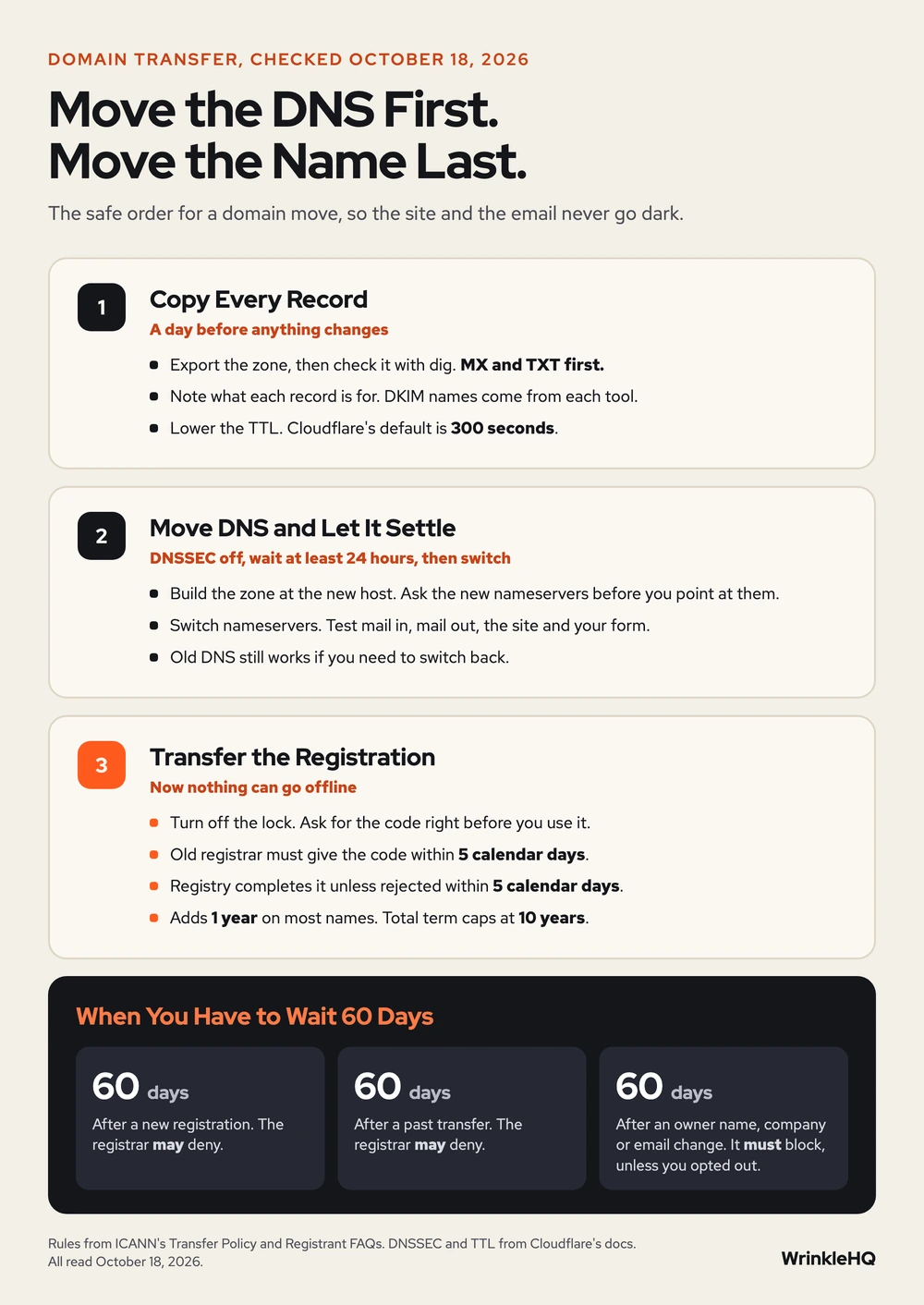
Step One, Copy Every DNS Record Before You Touch Anything
Open the DNS page at your current host and export the zone if it offers a button for it. Many do. Then check the export against what the public internet sees, because exports miss things. These commands work on a Mac or Linux terminal. Swap in your own domain for the example name.
dig +short NS example.com
dig +short A example.com
dig +short A www.example.com
dig +short CNAME www.example.com
dig +short MX example.com
dig +short TXT example.com
dig +short TXT _dmarc.example.com
dig +short TXT google._domainkey.example.com
Write the results in a sheet with five columns. Name, type, value, priority for MX records, and what the record is for. The last column is the one that saves you. A TXT record with no note looks like junk, and someone deletes it.
Look hardest at these, because they are the ones that hurt when they go missing.
- MX records. These route your mail. Google Workspace now uses one record,
smtp.google.comat priority 1. Older accounts may still show the legacy aspmx values, and Google says those still work. - TXT records. SPF, DMARC and the site checks for Google and Microsoft live here. Our SPF, DKIM and DMARC guide shows what each one does.
- DKIM records. Each sending tool has its own name, like
google._domainkey. A dig on the bare domain will not show them. Get the names from each tool's domain settings page. - Subdomains. Booking pages, client portals and mail tracking links often run on a subdomain someone set up years ago.
If your DNS host lets you, lower the TTL on your records a day ahead. TTL is how long other servers cache an answer, in seconds. Cloudflare's own default for unproxied records is 300 seconds, or five minutes. A short TTL means a mistake fixes itself fast.
Step Two, Move DNS First and Let It Settle
Set up the zone at the new DNS host before you change a single nameserver. Add every record from your sheet. Some hosts scan your old records and copy them for you. Cloudflare does this, and its own docs warn the scan may miss some. Check every line against your sheet.
Then ask the new nameservers directly, before the world is pointed at them. Put the new server's name after the @ sign.
dig +short MX example.com @new-nameserver-name
dig +short TXT example.com @new-nameserver-name
If those answers match your sheet, change the nameservers at your current registrar. If they do not, fix the zone first. This is the check that catches a missing record before your customers do.
Turn off DNSSEC first if it is on. DNSSEC signs your DNS answers. If the old signing record stays at the registrar while the nameservers change, resolvers that check DNSSEC can fail to load your domain at all. Cloudflare's transfer docs say to remove the DS record at your current registrar and wait at least 24 hours before you change nameservers. Turn DNSSEC back on at the new host once the move is done.
After the switch, give it a day. Send a test email in from an outside account and send one out. Submit your own website form. Load the site on a phone off Wi-Fi. If anything is wrong, your old DNS is still sitting there, and you can switch back.
Some website builders do not let you change nameservers at all while they hold the name. Cloudflare's docs name Shopify, Block and Wix. The fix is a longer route, and it is in the finishing pieces below.
Step Three, Transfer the Registration
Now the part every other guide covers. With DNS settled, this step cannot take you offline.
- Turn off the lock at the current registrar. The lock shows up as
clientTransferProhibited. Some registrars have more than one lock, such as a separate privacy lock, so turn off each one. - Get the transfer code. It may be called the auth code, EPP code or AuthInfo code. Ask for it right before you use it. Cloudflare's docs warn that codes often expire.
- Start the transfer at the new registrar. Enter the name, paste the code, confirm your contact details and pay.
- Approve it. Watch the owner email for a confirmation request and answer it. Name.com says approving at the old registrar too can cut the wait to a day or two.
- Wait. Under ICANN's policy the registry completes the move unless the old registrar rejects it within five calendar days. Cloudflare says most registrars finish within five business days, and some country names take up to ten.
What it costs. For most generic names you pay for one more year, and that year is added to your current expiry. ICANN's policy adds one year on a completed transfer, but the total can never go past ten years. So a name with nine years left will not gain a full year. Some country names, like .uk, have no transfer fee and add no year.
ICANN is reviewing its Transfer Policy, and some of these timers may change. Before a big move, check ICANN's transfers page for the current rules.
Look It Up Yourself
We opened each of these in October 2026 before writing this guide.
- ICANN, Transfer Policy, sections on denial reasons, the five day windows and the one year extension.
- ICANN, Transfers page for registrars, with policy versions and dates.
- ICANN, Registrant FAQs, on transfers, contact changes and expired names.
- Cloudflare, Transfer your domain to Cloudflare, Cloudflare Registrar docs.
- Cloudflare, Time to Live, Cloudflare DNS docs.
- Google, Set up MX records for Google Workspace, Google Workspace Knowledge Center.
- Name.com, Transferring Domain Names, When, How, and Why You Should, September 29, 2021.
What the Finishing Pieces Contain
With the three steps above you can move a domain and keep the site and mail running. The finishing pieces give you the record sheet we fill in before every move, the edge cases that stall a transfer for weeks, and the check we run once the move is done. A domain is one part of the stack. See how we run hosting and IT for a small business, or how we put sites on Cloudflare static hosting once the DNS lives there.
The finishing pieces
Get the Rest of This Guide
You have the method. The finishing pieces are the parts you copy straight into your own work:
- The Record Sheet We Fill In Before Every Move
- Edge Cases That Stall a Transfer
- The Check We Run Once the Move Is Done
Odds and Ends
- Will my website go down when I transfer my domain?
- Not if your DNS records stay the same. The transfer only moves the registration. Sites go down when the nameservers change before every record has been copied to the new DNS host.
- How long does a domain transfer take?
- The active work is about half an hour. Under ICANN's policy the registry completes the move unless the old registrar rejects it within five calendar days, and approving at the old registrar can make it faster.
- Can I transfer a domain that has expired?
- Usually yes. ICANN's FAQ says a registrar cannot deny a transfer just because the name expired. If it has reached the redemption period, the old registrar must restore it first, and that may cost a fee.
- Does transferring a domain cost money?
- For most generic names you pay for one more year, and that year is added to your expiry date. ICANN caps the total at ten years. Some country names, like .uk, move with no fee and no added year.
- Why can't I transfer my domain for 60 days?
- A registrar may deny a transfer within 60 days of a new registration or a past transfer. A change to the owner name, company or email also locks transfers for 60 days unless you opted out first.
Other Answers
 Avenue 8 of 8
Hosting and IT That Stays Out of Your Way
Your site runs on edge hosting that stays fast and does not need patching. T3CHS handles the rest of the hosting and IT so a broken email or a lost password is not your whole afternoon.
Read it Free guideEmail Guide
SPF, DKIM and DMARC Setup for a Small Business
SPF lists who may send for your domain, DKIM signs each message, and DMARC checks that the two match your From address. Set up all three for every tool that sends as you, then tighten DMARC slowly so your own invoices never get blocked.
Read it Free guideHosting Guide
Host a Static Site on Cloudflare Workers Static Assets
A folder of HTML plus two small files is all it takes to serve a site from Cloudflare's edge, with a www redirect and a real 404 page. This guide gives you both files and explains each line.
Read itWe sell time
Get Years of Building Switched On in Hours
A thirty minute call. A written price. Nothing built until you say yes.