Security Guide
A Password Manager for a Small Business, Set Up in One Day
Bitwarden Teams costs $4 a user each month on a yearly plan, and 1Password Business costs $8.99. Either one beats the shared spreadsheet most small teams run on, and you can move the whole team over in one working day.
- Year 1Website
- Year 2Map Listings
- Year 3Booking Tool
- Year 4Front Desk
- Year 5Payments
- Year 6Reports
Same six pieces.
Years of lessons, one read.
Free to read. Most of this guide is open. The finishing pieces at the end come to you when you opt in.
Start Here
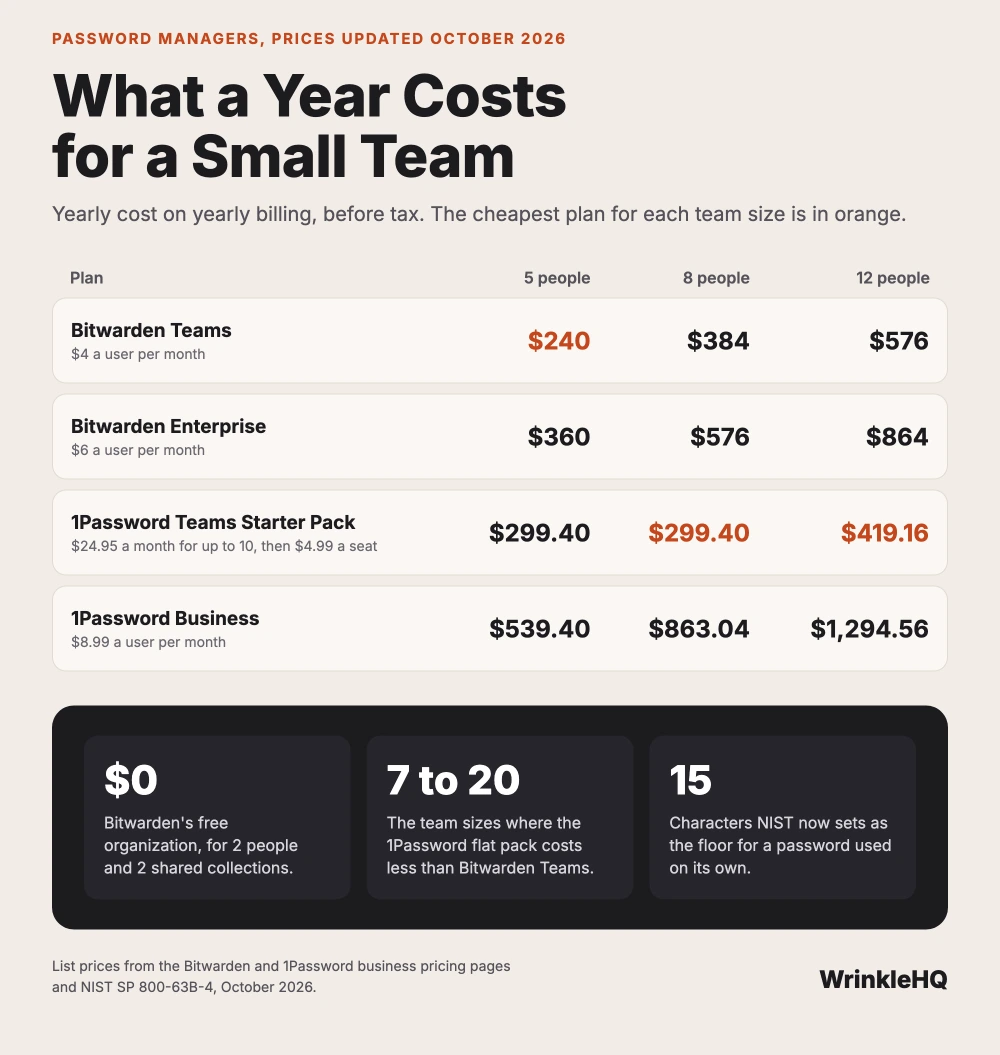
- Bitwarden Teams at $4 a user is the cheapest paid plan for 6 people or fewer. From 7 to 20 people, 1Password's Teams Starter Pack costs less.
- Bitwarden's free plan covers 2 people and 2 shared collections. That fits an owner and a partner, and nothing bigger.
- Build shared vaults around jobs, such as payments or the website, not around people. Then a new hire gets access by role in one click.
- NIST now says a password used alone should be at least 15 characters, and that you should stop forcing staff to change passwords on a schedule.
- The day someone leaves, remove them, then change every shared login they could see. Removal alone does not wipe a copy already saved on their phone.
Bitwarden or 1Password, Side by Side
Prices updated October 2026.
We built this from jobs we have done and the public sources cited below.
Most small shops keep their logins in one of three places. A spreadsheet on the office computer. The browser on whatever laptop the owner uses. Or the owner's head. All three fail the same way. One person leaves, gets sick, or loses a phone, and the business cannot get into its own bank, its own domain, or its own phone line.
A password manager fixes that. It keeps every login in an encrypted vault, fills it in for the right person, and lets you share a login without ever showing the password. For a small business the choice usually comes down to two names. Bitwarden is the low cost pick with open source code. 1Password is the polished pick with a flat price for small teams.
| Plan | Price, billed yearly | Who it fits | The catch |
|---|---|---|---|
| Bitwarden Free organization | $0 | Two people, such as an owner and a partner | Only 2 people and 2 shared collections |
| Bitwarden Teams | $4 a user per month | Any size team that wants the lowest cost | No admin policies and no account recovery. Those are on Enterprise. |
| Bitwarden Enterprise | $6 a user per month | Teams that must force two step login on everyone | Costs half again as much as Teams |
| 1Password Teams Starter Pack | $24.95 a month flat for up to 10 people | Teams of 4 to 10 | Seats 11 to 20 cost $4.99 each a month. Past 20 you move up. |
| 1Password Business | $8.99 a user per month | Teams that want Okta, Entra ID or Duo sign in | The most costly plan on this list per person |
Bitwarden's business pricing page lists Teams at $4 and Enterprise at $6 a user each month, both billed yearly. Its help pages say the free organization holds 2 people and up to 2 collections. 1Password's business pricing page lists the Teams Starter Pack at $24.95 a month for 10 people, extra seats at $4.99, and Business at $8.99 a user, all billed yearly, with a 14 day trial and no card needed.
So the math runs like this. At 5 people, Bitwarden Teams costs $240 a year and the 1Password Starter Pack costs $299.40. At 7 people, Bitwarden costs $336 and 1Password still costs $299.40. From 7 people up, the flat price wins. At 12 people the Starter Pack runs $419.16 a year, with 2 extra seats, against $576 for Bitwarden Teams. It stays ahead up to its cap of 20. Past 20, Bitwarden Teams is the cheapest paid plan again.
What a Small Team Actually Needs From One
Feature lists for these tools run long. Most of it is for companies with an IT department. A shop with 3 to 15 people needs five things, and both tools have all five.
- Shared vaults or collections. A place where the whole front desk can use the card processor login without each person keeping a copy.
- Fill without showing. A worker can sign in to the parts supplier without ever seeing the password. When they leave, they never knew it.
- An event log. A record of who opened or changed which login. You want this the first time a setting changes and nobody remembers doing it.
- Apps on every device your team uses. Phones, the shop laptop, the front desk PC, and the browser on each.
- A way back in. A plan for the day the owner forgets the master password.
The fifth one is where the plans differ. 1Password lists account recovery on its business plans, so an admin can help a locked out worker back in. On Bitwarden, the account recovery workflow is an Enterprise feature, along with policies such as forcing two step login. On Bitwarden Teams, every person must guard their own master password, and a lost one can mean a lost personal vault. Shared collections stay safe, because the organization owns them.
If you have one tech who loses a phone every year, that difference is worth the extra $2 a user.
Build the Vaults Around Jobs, Not People
The mistake we see most is one big shared vault called Office. Everyone gets everything. The new part timer can see the bank login. And when you want to take one thing away, you cannot, because it is all one pile.
Sort logins by the job they do instead. We use the same 8 avenues we use to run any business, and each one becomes a vault or a collection.
| Vault | What goes in it | Who gets it |
|---|---|---|
| Getting Found | Google Business Profile, Bing Places, Apple Business, directory listings | Owner, marketing help |
| Answering | Phone system, call tracking, texting line | Owner, front desk |
| Quoting and Booking | Shop software, parts suppliers, calendar | Front desk, techs |
| Getting Paid | Card processor, bank, payroll | Owner only, plus a bookkeeper if you have one |
| Following Up | Email marketing, review tools | Owner, front desk |
| Content and Video | Social accounts, YouTube, photo storage | Owner, marketing help |
| Reporting | Google Analytics, Search Console | Owner |
| Hosting and IT | Domain registrar, DNS, website host, email admin | Owner and one backup person |
Two vaults matter more than the rest. Getting Paid moves money. Hosting and IT holds the domain, and whoever controls the domain controls your email and your website. Those two get the fewest people and the longest passwords.
Give access by vault, not by login. A new front desk hire gets Answering, Quoting and Booking, and Following Up on day one. You never pick through a list of 200 logins.
Roll It Out in One Day
You can do this in a single working day if you do it in this order. Start in the morning, before the phones get busy.
- Make the owner account first. Pick a master password of four or five random words. Write it on paper and put it in a safe or a lockbox. Turn on two step login with an authenticator app, not a text message.
- Make the vaults. Create the 8 vaults from the table above, even if some start empty.
- Move the crown jewels by hand. Add the domain registrar, the bank, the card processor, the main email admin and the phone system yourself. Change each password as you add it, and let the manager make a new long one.
- Import the rest. Bitwarden imports exports from Chrome, Edge, Firefox and Safari, and from CSV files. 1Password has its own import guide. Bitwarden's help page says to delete the export file once the import is done. Do it right away and empty the trash, because that file holds every password in plain text.
- Invite the team. Send invites after lunch, and give each person only the vaults their job needs.
- Turn off browser saving. On every shop computer, turn off the browser's own password saving. Otherwise people keep using it, and you have two lists again.
- Check the next morning. Ask each person to sign in to three things they use daily from the vault. If one fails, fix it then.
Two step codes are the part people forget. If the code for the bank only comes to the owner's phone, the business still depends on one phone. 1Password's support pages say a login item can hold the one time code and fill it for you. Bitwarden Teams includes its built in authenticator, which does the same. Then a trusted second person can sign in when the owner is out.
Corrections
Much of the password advice small businesses still follow is out of date. The federal standard changed, and the old rules now hurt more than they help.
Forced changes every 90 days. NIST's current Digital Identity Guidelines, SP 800-63B, say a system must not make people change passwords on a schedule. Change one when there is a sign it leaked. A forced change mostly teaches people to add a 1 to the end.
Symbol and number rules. The same NIST guide says systems must not force mixes of character types. Length does the work. A password used alone should be at least 15 characters. With a second factor, the floor is 8. Sites should allow at least 64 characters and should let you paste, so a manager can fill them.
The spreadsheet is fine if it has a password on it. It is not. A locked spreadsheet still gets copied, emailed and synced, and nobody can tell who opened it.
Stolen passwords are old news. Verizon's 2026 Data Breach Investigations Report says software flaws, at 31 percent of breaches, passed stolen passwords as the top way attackers got in this year. Stolen logins are still a frequent cause. That is a reason to keep going, not to stop.
Offboarding the Day Someone Leaves
A good exit takes about fifteen minutes when the vaults are built around jobs. Do it the same day, before the person's last paycheck if you can.
First, remove the person from the organization. Bitwarden's help pages say removal ends their access to the shared collections. They keep their own personal vault, which is fine. Anything the business owns lives in the collections, not with them.
Second, change the passwords they could see. This step gets skipped, and it matters. Bitwarden's own docs warn that a device that was offline keeps a read only copy for a while. They tell admins to update the logins the person had access to when you remove them. Start with Getting Paid and Hosting and IT.
Third, look at the two step codes. If that worker's phone held the code for any business account, move it to the vault or to the owner's phone today.
Fourth, read the event log for their last week. You are not looking to blame anyone. You are looking for a login they changed that nobody else knows about.
Look It Up Yourself
Bitwarden, business plan pricing page, Teams and Enterprise, October 2026.
Bitwarden Help Center, About Organizations, Remove Users, Import Data, and Two Step Login Recovery Code.
1Password, business pricing page, Teams Starter Pack and Business, October 2026.
1Password Support, About Your Emergency Kit, and Use 1Password as an Authenticator.
NIST, SP 800-63B-4, Digital Identity Guidelines, Authentication and Authenticator Management, password rules in section 3.1.1.
Verizon, 2026 Data Breach Investigations Report, summary page.
What the Finishing Pieces Contain
With the steps above you can pick a manager, build the vaults and move a small team over in one day. The finishing pieces give you the exact vault map we start every business with, the break glass sheet we keep on paper for the day the owner cannot sign in, and the offboarding checklist line by line. Passwords are one part of the IT a small business runs on. See how we handle hosting and IT for a small business, or set up business email on your own domain next.
The finishing pieces
Get the Rest of This Guide
You have the method. The finishing pieces are the parts you copy straight into your own work:
- The Vault Map We Start Every Business With
- The Break Glass Sheet
- The Offboarding Checklist, Line by Line
Odds and Ends
- Is there a free password manager for a small business?
- Yes, for two people. Bitwarden's free organization covers 2 people and up to 2 shared collections. Past that, Bitwarden Teams is $4 a user each month billed yearly.
- Is 1Password or Bitwarden better for a small business?
- On price, Bitwarden Teams wins at 6 people or fewer and past 20. From 7 to 20 people, 1Password's Teams Starter Pack costs less, and 1Password lists account recovery on its business plans. Pick Bitwarden Enterprise if you need to force two step login on everyone.
- Should employees use the browser to save work passwords?
- No. Browser saving ties the login to one person's profile, and you cannot take it back when they leave. Turn it off on shop computers and keep work logins in shared vaults.
- How often should a business change its passwords?
- Only when there is a reason, such as a leak or a worker leaving. NIST's current guidance says systems should not force changes on a schedule. Use long passwords and two step login instead.
Other Answers
Free guideEmail GuideSet Up Business Email on Your Own Domain in 5 Steps
A free Gmail address costs nothing, but the account belongs to one person and leaves when that person leaves. An address at your own domain costs $7 a user each month on Google's Starter plan, or nothing on a small free plan, and the mail stays with the business. The setup takes an afternoon if you do the steps in the right order.
Read itFree guideEmail GuideSPF, DKIM and DMARC Setup for a Small Business
SPF lists who may send for your domain, DKIM signs each message, and DMARC checks that the two match your From address. Set up all three for every tool that sends as you, then tighten DMARC slowly so your own invoices never get blocked.
Read it Avenue 8 of 8
Hosting and IT That Stays Out of Your Way
Your site runs on edge hosting that stays fast and does not need patching. T3CHS handles the rest of the hosting and IT so a broken email or a lost password is not your whole afternoon.
Read itWe sell time
Get Years of Building Switched On in Hours
A thirty minute call. A written price. Nothing built until you say yes.