Email Guide
Google Workspace vs Microsoft 365 for Small Business
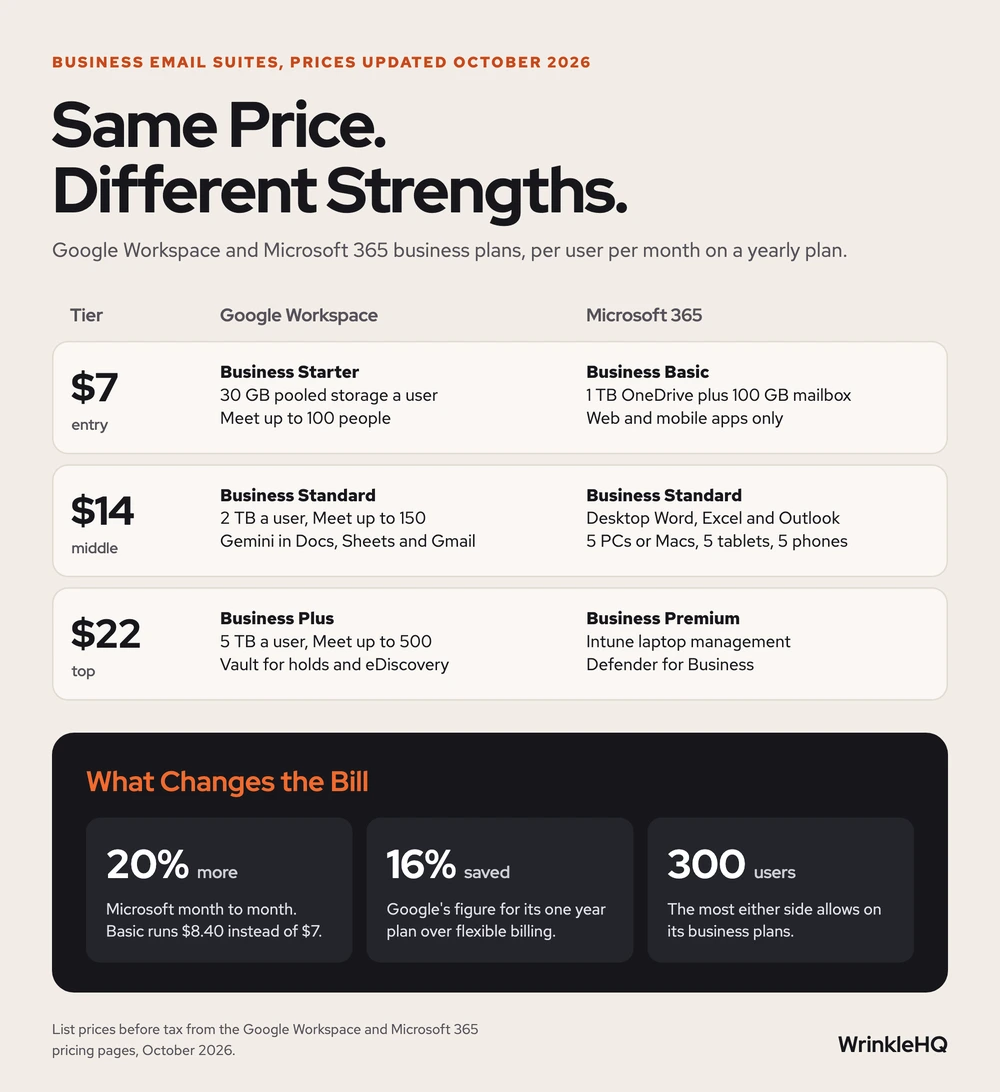
Google Workspace and Microsoft 365 now cost the same, $7, $14 and $22 a user each month on a one year plan. Google wins when your team works in a browser and shares files all day. Microsoft wins when someone lives in desktop Excel or Outlook, or when you want company laptops locked down from one screen.
- Year 1Website
- Year 2Map Listings
- Year 3Booking Tool
- Year 4Front Desk
- Year 5Payments
- Year 6Reports
Same six pieces.
Years of lessons, one read.
Free to read. Most of this guide is open. The finishing pieces at the end come to you when you opt in.
Start Here
- Since Microsoft's July 2026 price update, the three small business tiers carry the same price on both sides.
- Microsoft charges 20 percent more month to month, $8.40 instead of $7 on Basic. Google says its yearly plan saves 16 percent.
- The $7 tiers differ most. Google Starter has 30 GB of pooled storage a user. Microsoft Basic has 1 TB plus a 100 GB mailbox, but no desktop apps.
- Desktop Word, Excel and Outlook start at Microsoft's $14 Business Standard plan.
- Leaving is the real cost. Neither migration tool moves everything, and canceling deletes your data.
Prices Side by Side, October 2026
Prices updated October 2026.
We built this from jobs we have done and the public sources cited below.
| Tier | Google Workspace | Microsoft 365 |
|---|---|---|
| $7 a user | Business Starter. 30 GB of pooled storage per user. Meet calls up to 100 people. | Business Basic. 1 TB of OneDrive per user plus a 100 GB mailbox. Web and mobile apps only. |
| $14 a user | Business Standard. 2 TB per user. Meet calls up to 150 people, with recording. | Business Standard. Desktop Word, Excel, PowerPoint and Outlook on up to 5 PCs or Macs, 5 tablets and 5 phones. 1 TB per user. |
| $22 a user | Business Plus. 5 TB per user. Meet calls up to 500 people. Vault for holds and eDiscovery. | Business Premium. Adds Intune to manage laptops, Defender for Business and a 1.5 TB email archive. |
| Most users | 300 on each business plan | 300 across all business plans |
| Month to month | Google says the one year plan saves 16 percent | $8.40, $16.80 and $26.40 |
These are list prices per user per month, before tax, from each company's own pricing page. Google shows them with a one year commitment. Microsoft shows them paid yearly, on an annual plan that renews on its own.
A year ago the gap was real. In March 2026 Computerworld listed Microsoft Business Basic at $6 and Business Standard at $12.50, with a price rise due on July 1, 2026. Microsoft's own pages now show $7 and $14. Premium stayed at $22. So any comparison that calls Microsoft the cheap one is out of date.
Google is also running an offer for new customers. Its pricing page shows half off for the first three months. Treat that as a discount on year one, not as the real price of the plan.

What a Five Person Office Pays in Year One
Price per user is easy to compare and easy to misread. Say you run a five person office and want desktop apps, or 2 TB of storage each. That puts you on the middle tier on either side.
| Setup | Per User | Per Month | Per Year |
|---|---|---|---|
| Google Business Standard, one year plan | $14 | $70 | $840 |
| Microsoft Business Standard, paid yearly | $14 | $70 | $840 |
| Microsoft Business Standard, month to month | $16.80 | $84 | $1,008 |
| Microsoft Business Standard with Copilot | $23.50 | $117.50 | $1,410 |
These figures are a worked example built from the list prices above. Tax is extra.
The month to month row is the one to watch. Microsoft charges 20 percent more for the right to cancel in any month. On five seats that comes to $168 a year. If you are not sure you will stay, that can be money well spent. If you are sure, commit.
The last row shows how fast AI changes the bill. Copilot inside Word, Excel and Outlook adds $9.50 a user each month on this plan. Most small offices should start without it. Add it later for the one or two people who will really use it.
Where Google Workspace Wins
Google built its apps for the browser first. Docs, Sheets and Slides let several people type in one file at the same time, and Computerworld's long running review still rates Google well ahead on working together in a file.
That fits many small businesses. Picture a front desk, two techs in the field and an owner on a phone. Nobody needs pivot tables with macros. Everybody needs the same schedule and the same price sheet, live.
- Storage grows faster. Business Standard gives 2 TB per user and Plus gives 5 TB. Google pools it across the company, so a light user's space covers a heavy one.
- Gemini comes with the plan. On Business Standard and Plus, Google lists Gemini inside Gmail, Docs, Sheets, Slides, Drive and Meet. Business Starter gets Gemini in Gmail and the Gemini chat app only.
- Meetings are bigger. Meet holds 150 people on Standard and 500 on Plus.
- There is less to keep up. No desktop suite has to be installed and updated on every laptop.
The weak spot is the $7 tier. Thirty GB per user covers email and documents. It does not cover a team that saves job photos and video to Drive. Plan on Standard if your people store media.
Where Microsoft 365 Wins
Microsoft's edge is the desktop. From Business Standard up, each person can install full Word, Excel, PowerPoint and Outlook on up to five computers, five tablets and five phones. If your bookkeeper or estimator works in big Excel files, that alone can settle it.
- More room at the bottom tier. Business Basic includes 1 TB of OneDrive per user plus a separate 100 GB mailbox. Google Starter gives 30 GB, pooled.
- Laptop control at $22. Business Premium adds Intune to manage company devices and Defender for Business against ransomware and malware. That is device management at the small business price.
- Office files from customers. Contracts, insurance forms and bids often show up as Word and Excel files with tracked changes. They open cleanest in the program that made them.
- Copilot Chat is included. Every business plan comes with Copilot Chat at no extra cost. The version that works inside your own files and email is the paid one.
The weak spot is the clutter. Teams, Outlook and SharePoint do a great deal, and a five person office uses a small part of it. Someone still has to set it up and keep it tidy.
Corrections
Three claims show up in most comparisons of these two suites. Each one needs a fix in 2026.
- Microsoft is cheaper. It was, on the bottom two tiers, until July 1, 2026. The list prices now match. The cheaper choice is simply the one you pay for yearly.
- Google gives you more storage. Only from the middle tier up. At $7, Microsoft gives far more room, with 1 TB of files plus 100 GB of mail against 30 GB.
- You can always switch later. You can, but the tools leave things behind. Microsoft's migration guide says its tool moves mail, rules, calendars and contacts. It does not move room bookings, shared calendars, event colors or vacation replies, and contacts keep at most three email addresses each. Google's import tool moves email, calendar, contacts and tasks from Exchange Online, and only email from other sources. Files are a separate job on both sides.
So pick for the next five years, not the next five months. The switch is where the time and money go.
What Happens to Your Email If You Leave
Read this part before you sign up. It decides how hard leaving will be.
Google's help page on canceling says user data is deleted and cannot be restored. It names Gmail messages among the things to export first, with its Data Export tool. You can start a new subscription within 51 days of canceling. Microsoft's pricing page says the same thing in one line. When a subscription is canceled, all associated data is deleted.
Your domain is the other half. Your email address lives on your domain, not with Google or Microsoft. Whoever controls your DNS can point mail anywhere. If you are not sure who holds your domain, find out first. Our guide to transferring a domain name shows how to take it back.
Whichever suite you choose, set up SPF, DKIM and DMARC on the first day. Without them, your quotes and invoices land in spam. Our SPF, DKIM and DMARC guide has the records for both Google and Microsoft.
Pick in Two Minutes
| If This Is You | Pick |
|---|---|
| Your team works in a browser and shares files all day | Google Workspace Business Standard |
| You only need email and documents, under 30 GB a person | Google Workspace Business Starter |
| Someone builds bids or keeps the books in desktop Excel | Microsoft 365 Business Standard |
| You want cheap seats with lots of storage and no desktop apps | Microsoft 365 Business Basic |
| You want company laptops locked and wiped from one screen | Microsoft 365 Business Premium |
| You have more than 300 people | Neither business plan. Both stop at 300. |
You do not have to put everyone on one tier. Microsoft's FAQ says you can mix its business plans, up to 300 seats in total. So the office manager can sit on Basic while the estimator gets Standard.
Look It Up Yourself
- Google Workspace, Compare Flexible Pricing Plan Options, pricing page, October 2026.
- Google Workspace Admin Help, Cancel Google Workspace, updated October 20, 2026.
- Google Workspace Admin Help, Import email with the data import tool.
- Microsoft, Microsoft 365 Pricing for Business, Plans and Features, with the Business Basic, Business Standard and Business Premium plan pages, October 2026.
- Microsoft Learn, Perform a Google Workspace migration to Microsoft 365 or Office 365, updated October 14, 2026.
- Computerworld, Preston Gralla, Google Workspace vs. Microsoft 365, What is the best office suite for business, updated March 4, 2026.
What the Finishing Pieces Contain
With the tables above you can pick a suite and know what it will cost. The finishing pieces give you the seven questions we ask an owner before we pick, the order we follow to move mail from one suite to the other without losing any, and the edge cases that change the answer. Email is one part of hosting and IT, which we set up and run for small businesses.
The finishing pieces
Get the Rest of This Guide
You have the method. The finishing pieces are the parts you copy straight into your own work:
- The Seven Questions We Ask Before We Pick
- The Order We Follow to Switch Suites
- Edge Cases That Change the Answer
Odds and Ends
- Is Google Workspace cheaper than Microsoft 365?
- Not at list price anymore. As of October 2026 both charge $7, $14 and $22 a user each month on a yearly plan. Microsoft's month to month price is 20 percent higher, and Google is running a half off offer for new customers for three months.
- Do I need Microsoft 365 if I have Google Workspace?
- Only if someone needs the desktop Office apps. Microsoft sells an apps only plan without business email for that case, so one person can have desktop Excel while the company stays on Google.
- Will I lose my emails if I cancel Google Workspace?
- Yes, unless you export or move them first. Google says canceling deletes user data and it cannot be restored. Use the Data Export tool, or finish moving the mail to the new provider, before you cancel.
- Can I move from Google Workspace to Microsoft 365 without losing email?
- Yes. Microsoft's tool moves mail, rules, calendars and contacts in batches. Plan to rebuild vacation replies, shared calendars and room bookings by hand, because the tool skips them.
Other Answers
 Avenue 8 of 8
Hosting and IT That Stays Out of Your Way
Your site runs on edge hosting that stays fast and does not need patching. T3CHS handles the rest of the hosting and IT so a broken email or a lost password is not your whole afternoon.
Read itFree guideEmail GuideSPF, DKIM and DMARC Setup for a Small Business
SPF lists who may send for your domain, DKIM signs each message, and DMARC checks that the two match your From address. Set up all three for every tool that sends as you, then tighten DMARC slowly so your own invoices never get blocked.
Read it Free guideDomain Guide
How to Transfer a Domain Name Without Losing Your Site or Email
To transfer a domain, turn off the transfer lock at your current registrar, get the transfer code, and start the transfer at the new one. Do your DNS first, though. The transfer almost never breaks a site. Lost DNS records do, and email is what usually goes dark.
Read itWe sell time
Get Years of Building Switched On in Hours
A thirty minute call. A written price. Nothing built until you say yes.