Email Guide
Set Up Business Email on Your Own Domain in 5 Steps
A free Gmail address costs nothing, but the account belongs to one person and leaves when that person leaves. An address at your own domain costs $7 a user each month on Google's Starter plan, or nothing on a small free plan, and the mail stays with the business. The setup takes an afternoon if you do the steps in the right order.
- Year 1Website
- Year 2Map Listings
- Year 3Booking Tool
- Year 4Front Desk
- Year 5Payments
- Year 6Reports
Same six pieces.
Years of lessons, one read.
Free to read. Most of this guide is open. The finishing pieces at the end come to you when you opt in.
Start Here
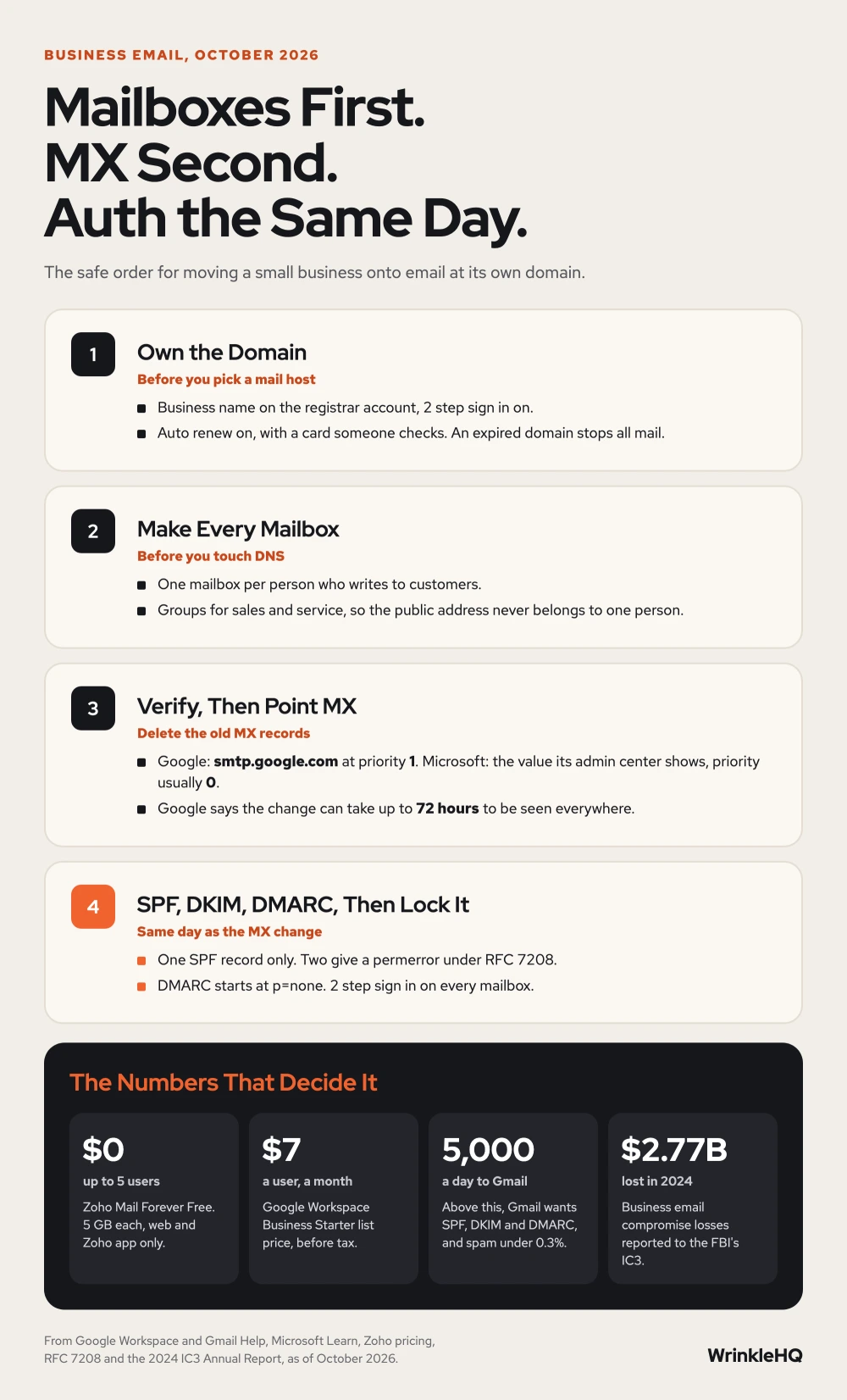
- Put the domain in the business name, with 2 step sign in and auto renew on, before you pick an email host.
- Make every mailbox at the new host before you change the MX record. Mail sent in the gap can bounce.
- Google says to use one MX record, smtp.google.com at priority 1, and to remove the old ones. Changes can take up to 72 hours.
- Add SPF, DKIM and DMARC on day one. Gmail has required SPF or DKIM from every sender since February 1, 2024.
- The old trick of reading business mail inside free Gmail is closing. Gmail stopped taking new users for it after early 2026.
Free Address or Your Own Domain
Prices updated October 2026.
We built this from jobs we have done and the public sources cited below.
We set up mail for our own brands, and we have moved mail for shops that started on a free address. The free address is fine on day one. It gets costly later. A customer has to trust a stranger's Gmail. A tech who quits takes the inbox with him. And nobody can turn on the rules that stop someone from faking your name.
You have four real ways to get mail at your own domain. They differ in what they cost and in whether you can send, not just receive.
| Route | What it costs | What you get | The catch |
|---|---|---|---|
| Forwarding only, such as Cloudflare Email Routing | Free on Cloudflare's free plan | Mail to your domain lands in an inbox you already have. Up to 200 routing rules per domain. | It only receives. Replies go out from your personal address unless you set up sending somewhere else. |
| Zoho Mail Forever Free | Free for up to 5 users | Real mailboxes on one domain, 5 GB each | No IMAP, POP or ActiveSync. You read mail on the web or in Zoho's own app. The sixth user moves everyone to a paid plan. |
| Google Workspace Business Starter | $7 a user per month before tax | Gmail on your domain, 30 GB of pooled storage per user, up to 300 users, a 14 day trial | Storage is shared, so one heavy user eats into the pool. |
| Microsoft 365 Business Basic | Listed on Microsoft's plan page, which changes by billing term | Outlook on your domain with web and mobile apps | Desktop Office apps are a higher plan. |
For a shop with a few people, any of the last three works. Pick by where your team already lives. If the office runs on Gmail and Google Sheets, stay with Google. If the books live in desktop Excel, go Microsoft. The steps below are the same for both, and we note where they differ.
Step One, Own the Domain in the Business Name
Your email is only as safe as the account that holds the domain. Whoever controls the registrar login controls where your mail goes. A domain left in a past web designer's account, on a card that has expired, is one of the easiest ways for a business to lose its mail.
Do these three things before you sign up for any email host.
- Sign in at the registrar and check that the owner name is the business, not a past vendor or a past employee.
- Turn on 2 step sign in for that registrar account.
- Turn on auto renew and put a card on file that someone checks. An expired domain stops all mail at once.
If the domain sits in someone else's account, move it first. Our guide on how to transfer a domain name covers the safe order, so the site and any current mail keep working while it moves.
Step Two, Make the Mailboxes Before You Touch DNS
Sign up with the host and add your domain. Then create every user before you change anything in DNS. Microsoft says this in plain words in its setup docs. Add users before you update the MX record, so mail keeps working while it moves to the new host.
The reason is simple. The moment the MX record points at the new host, it starts taking mail for your domain. If a mailbox does not exist there yet, mail for that person can bounce back to the sender.
Not every address needs a paid seat. Know the three kinds.
- A mailbox is a paid user with its own login and inbox. One per person who sends mail.
- An alias is an extra address on a mailbox. Use it for a second name, such as billing@ going to the owner.
- A group is one address that lands in several inboxes. Use it for sales@ or service@, so a quote request reaches two people.
For a small shop we usually start with one mailbox per person who writes to customers, then a group for the address printed on the website and the trucks. That way the public address never belongs to one person.
Step Three, Verify the Domain and Point the MX Record
The host first asks you to prove you own the domain. It gives you a TXT record to add at your DNS host. Add it, wait a few minutes, and click verify.
Next comes the MX record. That is the record that tells the world where to deliver mail for your domain. For Google Workspace, Google's help page says to use one MX record and to remove any other MX records.
Type   Host   Value             Priority   TTL
MX     @      smtp.google.com   1          3600
For Microsoft 365, copy the MX value the admin center shows you. Microsoft says to set the priority to the highest value your DNS host allows, which is usually 0, with a TTL of 3600. Microsoft also asks for an autodiscover CNAME so Outlook can set itself up.
Type    Host           Value
MX      @              (copy from the Microsoft 365 admin center)
CNAME   autodiscover   (copy from the Microsoft 365 admin center)
Then delete the old MX records. Google warns that mail may not work right if old MX records stay. Microsoft says to remove them or give them a lower priority. Google says the change can take up to 72 hours to be seen everywhere, so do the cutover early in a slow week, not the day before a big job.
Old mail does not move on its own. Microsoft says new mail goes to the new host, and existing mail stays at the old one unless you migrate it. Keep the old account open until you have copied what you need.
Step Four, Add SPF, DKIM and DMARC the Same Day
Receiving mail works the moment MX is right. Sending mail that lands in the inbox takes three more records. Gmail's sender rules, in force since February 1, 2024, say everyone who sends to Gmail accounts needs SPF or DKIM. Anyone who sends more than 5,000 messages a day to Gmail needs SPF, DKIM and DMARC, and must keep the spam rate under 0.3 percent.
A shop sending invoices and estimates will not hit 5,000 a day. Set all three up anyway. They are the records that stop a stranger from sending a fake invoice in your name.
Type   Host     Value
TXT    @        v=spf1 include:_spf.google.com ~all
TXT    _dmarc   v=DMARC1; p=none; rua=mailto:dmarc@yourdomain.com
That SPF line is the one Google's help page gives. For Microsoft 365, the docs give v=spf1 include:spf.protection.outlook.com -all. Your domain can have only one SPF record. If your CRM, your invoicing app or your website form also sends as your domain, add their includes to that one record. Microsoft says this too. Do not make a second SPF record. Merge into the first.
DKIM is a key the host makes for you. In Google a super admin generates it in the admin console, under Gmail and Authenticate email, and adds it as a TXT record named google._domainkey. Google says to wait 24 to 72 hours after turning on Gmail first, and to pick a 2048 bit key if your DNS host allows it. In Microsoft you add two CNAME records named selector1 and selector2. Our full guide to SPF, DKIM and DMARC walks through each record and the lookup limit that trips up busy domains.
Corrections
A popular free business email setup goes like this. Set up forwarding, then have Gmail fetch the mail and send as your domain address. That advice is going stale fast.
Google announced that Gmailify and the Check mail from other accounts feature are ending. After the first quarter of 2026 the feature takes no new users. People who already use it can keep it until January 2027. Forwarding still works, and the Gmail phone app can still add other accounts by IMAP. But the free desktop setup that so many guides show is closing.
Forwarding alone has a second problem. It only brings mail in. When you hit reply, the customer sees your personal address unless you set up sending through another service. And with no SPF or DKIM for your domain behind that reply, it is more likely to land in spam.
So the free route is fine for a side project. For a business that sends quotes and invoices, a real mailbox on a real host is the cheaper choice once you count the missed mail.
Step Five, Lock Every Mailbox
A business inbox is where invoices, bank notices and password resets land. That makes it a target. The FBI's Internet Crime Complaint Center logged 21,442 business email compromise complaints in 2024, with reported losses of $2,770,151,146.
Do this the same day the mailboxes go live.
- Turn on 2 step sign in for every user, and require it in the admin settings so nobody can skip it.
- Keep the admin login separate from anyone's daily mailbox, and give it to the owner.
- Write down who has admin rights. Remove a person's access the day they leave, and turn their mailbox into a group or alias so mail to them still reaches someone.
- Never pay a changed bank account from an email alone. Call the vendor on a number you already have.
Look It Up Yourself
We opened each of these in October 2026 before writing this guide.
- Google Workspace Admin Help, Set up MX records for Google Workspace.
- Gmail Help, Email sender guidelines.
- Google Workspace Admin Help, Set up SPF, and Set up DKIM.
- IETF, RFC 7208, Sender Policy Framework, section 4.5.
- Gmail Help, Learn about upcoming changes to Gmailify and POP in Gmail.
- Google Workspace, Compare Flexible Pricing Plan Options, pricing page, October 2026.
- Microsoft Learn, Connect your domain by adding DNS records, Microsoft 365 admin, updated April 23, 2026.
- Zoho Mail, Pricing and the Forever Free plan, October 2026.
- Cloudflare Docs, Email Routing and Email Routing limits, updated September and October 2026.
- Federal Bureau of Investigation, Internet Crime Complaint Center, 2024 IC3 Annual Report.
What the Finishing Pieces Contain
With the five steps above you can move a small business onto its own domain without losing mail. The finishing pieces give you the record sheet we fill in before every cutover, the test we run in the first hour after the MX change, and the edge cases that cause silent mail loss weeks later. Email is one part of the IT a small business runs on. See how we handle hosting and IT for a small business.
The finishing pieces
Get the Rest of This Guide
You have the method. The finishing pieces are the parts you copy straight into your own work:
- The Record Sheet We Fill In Before Every Cutover
- The Test We Run in the First Hour
- Edge Cases That Cause Silent Mail Loss
Odds and Ends
- Can I get a business email for free?
- Yes, with limits. Zoho Mail's Forever Free plan covers up to 5 users on one domain with 5 GB each, read on the web or Zoho's app. Cloudflare Email Routing forwards mail to your domain for free, but it only receives. To send as your domain you need a real mail host.
- How long does it take to set up business email?
- The setup itself takes an afternoon. Google says MX changes can take up to 72 hours to be seen everywhere, so plan the switch for a slow week and keep the old mail account open until the new one has worked for a few days.
- Do I need a website to have a business email?
- No. You need a domain, not a website. The mail host only needs you to add a few DNS records to that domain. You can add a website later without touching the mail.
- Will I lose my old emails when I switch?
- Not if you copy them first. Changing the MX record only moves new mail. Old messages stay at the old host until you migrate them, so keep that account open until the copy is done.
- What is the difference between an alias and a mailbox?
- A mailbox is a paid user with its own login and inbox. An alias is an extra address that lands in a mailbox that already exists. Use mailboxes for people and aliases or groups for shared addresses like sales or service.
Other Answers
 Free guideEmail Guide
SPF, DKIM and DMARC Setup for a Small Business
SPF lists who may send for your domain, DKIM signs each message, and DMARC checks that the two match your From address. Set up all three for every tool that sends as you, then tighten DMARC slowly so your own invoices never get blocked.
Read it Free guideDomain Guide
How to Transfer a Domain Name Without Losing Your Site or Email
To transfer a domain, turn off the transfer lock at your current registrar, get the transfer code, and start the transfer at the new one. Do your DNS first, though. The transfer almost never breaks a site. Lost DNS records do, and email is what usually goes dark.
Read itAvenue 8 of 8Hosting and IT That Stays Out of Your Way
Your site runs on edge hosting that stays fast and does not need patching. T3CHS handles the rest of the hosting and IT so a broken email or a lost password is not your whole afternoon.
Read itWe sell time
Get Years of Building Switched On in Hours
A thirty minute call. A written price. Nothing built until you say yes.